
An honest 2026 guide. No affiliate links.
You land in Shanghai, clear immigration, connect to airport Wi-Fi, and open Instagram. It doesn't load. You try Google Maps. Nothing. WhatsApp. Nothing.
Now you're the person asking strangers at the taxi stand how to get to your hotel, because you can't pull up the address you screenshotted in Gmail.
Most "best VPN for China" articles are written by people who've never actually traveled here — or by people who get paid every time you click their link. I'm going to tell you what almost nobody writing about this will:
You probably don't need a VPN. You need an eSIM. And maybe not even that.
Here's how to figure out what you actually need, and how to set it up so day one doesn't feel like the one above.
🚫 1. What's actually blocked in China
The block list is real, but it's not everything you've heard. Here's the 2026 reality:
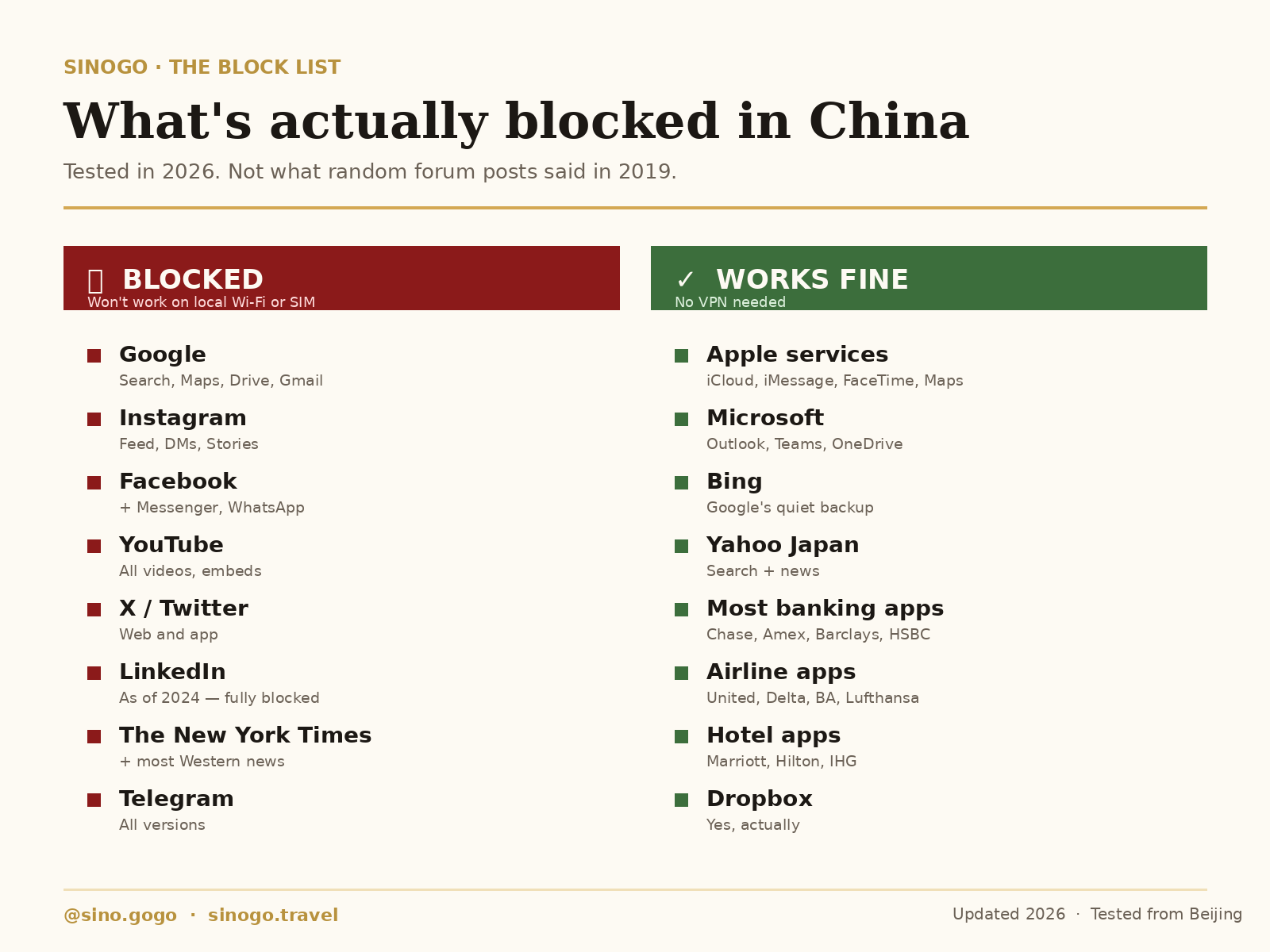
If your trip only needs maps, messaging, and payments, Chinese local apps cover all three — and they work better than the Western versions, because they're built for the country you're actually in.
👉 Full app guide: Every App You Need in China
A few things worth calling out:
- LinkedIn got added to the block list in 2024. If you're on a business trip, that's your first thing to work around.
- Banking apps almost all work. Chase, Amex, Barclays, HSBC — fine.
- Apple services all work. iMessage, FaceTime, Apple Maps. If everyone in your life is on iPhone, you can probably skip messaging apps entirely.
- Bing works. Not a joke. It's the backdoor Google most people forget about.
❓ 2. Do you actually need anything?
This is the question nobody else asks you. Before you spend money on a VPN or an eSIM, run through four questions:
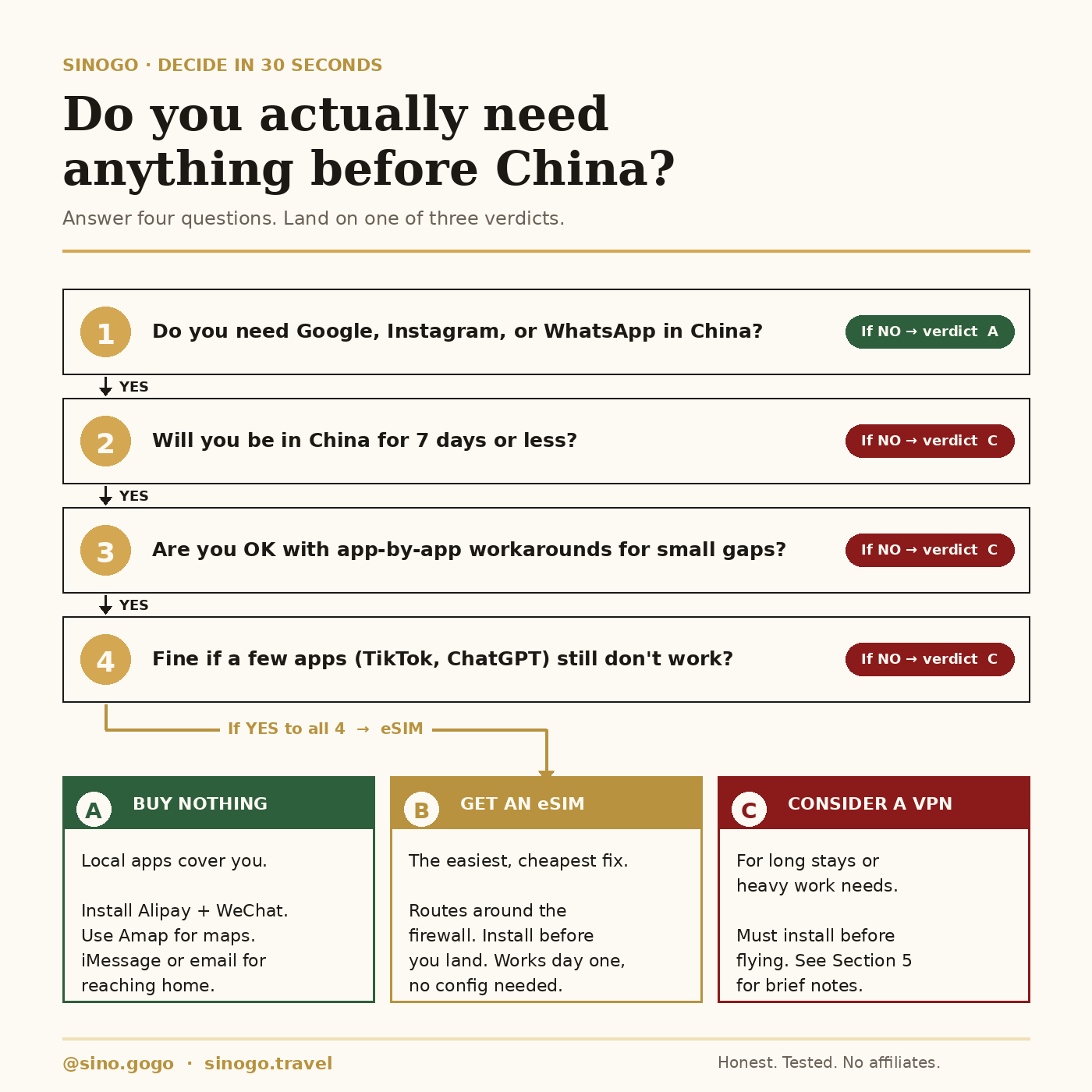
If you can say YES to all four — honestly — the answer is an eSIM. That's most travelers.
If you can't live 7 days without Google or Instagram, and you're also not okay working around individual apps, you might need a VPN. But that's a smaller group than people assume.
And if you're genuinely flexible — you use Apple services, you're fine using Alipay and WeChat, you don't mind email instead of WhatsApp for a week — you might not need to buy anything at all.
✅ 3. The recommended path: get an eSIM
For most travelers, an eSIM is the cleanest solution. Here's why:
- It routes your traffic through an international data connection, not a Chinese local network. Which means your phone behaves like it's still in your home country.
- You install it before you fly. No scrambling at the airport.
- No physical SIM swap. Your home number still works for calls and SMS.
- It works the moment you land. No VPN to connect, no app that might fail.
Four steps to set one up:
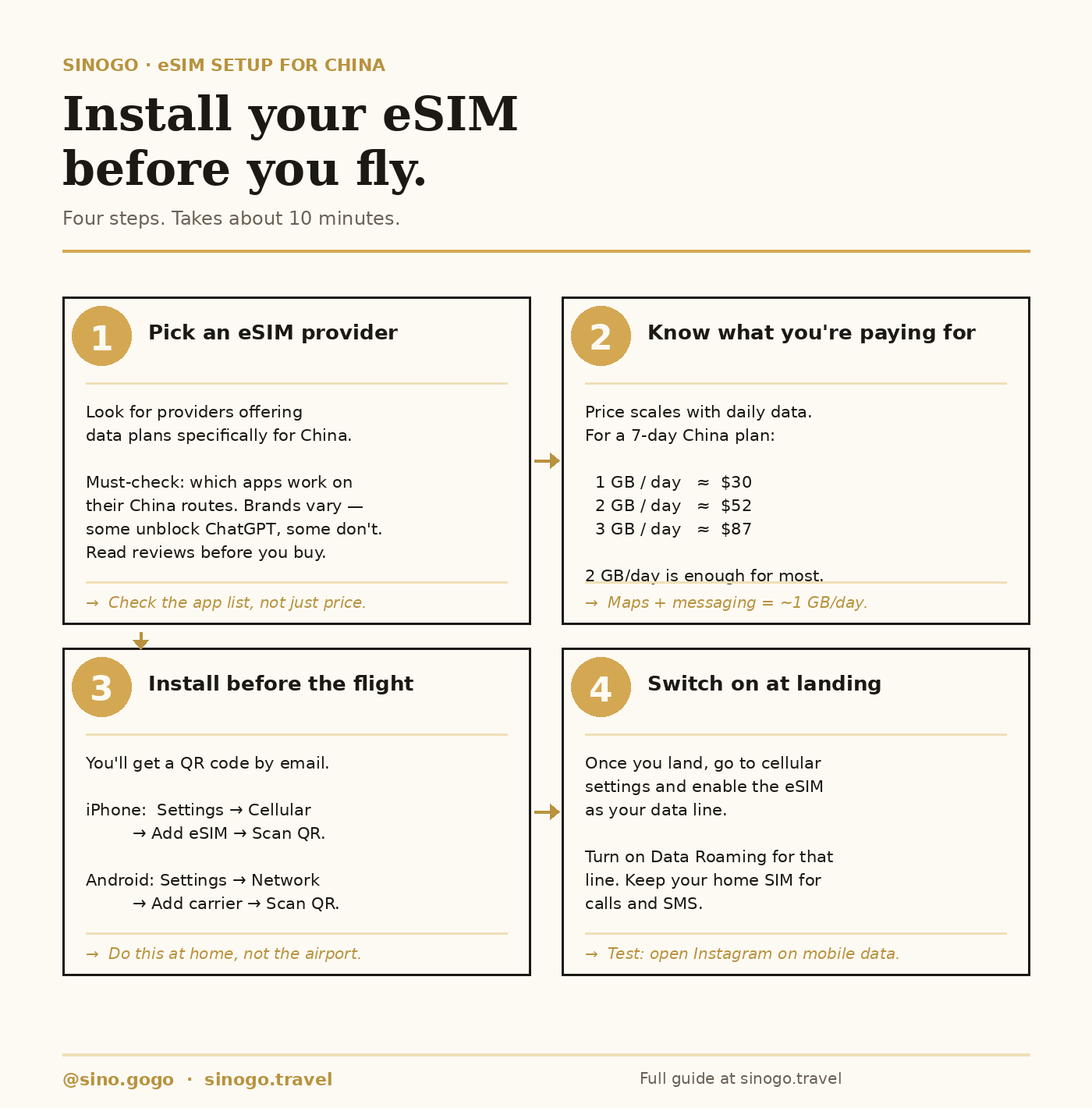
A few things the product pages don't tell you:
💡 Not every eSIM is the same. Different providers route traffic differently. Some of them let you use TikTok, ChatGPT, and other AI services. Some block those same apps on their China routes — because those apps enforce restrictions against Hong Kong IP addresses, which is where many eSIM routes land. Check each provider's app compatibility list before you buy. Don't assume.
💡 2 GB per day is plenty for most travelers. Maps, messaging, Instagram, and some photo uploads adds up to about 1 GB/day. 2 GB gives you buffer for video calls and streaming. Skip the 3 GB plans unless you're working remotely and uploading big files.
💡 Keep your home SIM active for calls and SMS. Your bank, your airline, your hotel — they'll all text you 2FA codes to your home number. Don't cut that off. The eSIM handles data only; your home SIM handles voice and SMS.
🛠️ 4. A brief word on VPNs
If an eSIM doesn't fit your situation — you're staying more than a month, you need a Chinese phone number and access to blocked apps, or you burn through data faster than eSIM plans allow — a VPN is the fallback.
Three things to know, nothing more:
- Most regular VPNs don't work in China. The firewall detects and blocks standard VPN protocols. You need one with active obfuscation technology that's being updated for the Chinese market specifically.
- Install it before you fly. Most VPN provider websites are blocked inside China. If you land without one, you can't download one. This is the single most common mistake.
- Have a backup. Whatever VPN you install, install a second one too. Servers get blocked, apps stop working, things change overnight. One provider going down mid-trip shouldn't be a crisis.
I'm not recommending specific brands in this post. Do your own research, read recent reviews (anything over 6 months old is outdated), and test whatever you pick before you fly. Unlike most sites that write about this, I don't get paid every time you click a brand name.
💡 5.Gloria tips
Some things I've learned the hard way:
Hotel Wi-Fi is often worse than mobile data. Many hotels throttle or block VPN protocols at the router level, even four- and five-star properties. If your VPN works fine on cellular but dies on hotel Wi-Fi, that's why. Fix: use your eSIM data instead.
"Airplane mode → reconnect" is the universal reset. When something stops working mid-trip — VPN drops, a site won't load, your eSIM seems asleep — toggle airplane mode on and off. 70% of problems resolve themselves.
If you landed with nothing installed, you still have options. Bing works for search. iCloud and iMessage still route to family. Your hotel can often help you buy a Chinese SIM card at reception. It's not ideal, but you won't be stranded.
⚖️ 6. A common question: is this legal?
I'm not a lawyer — this isn't legal advice.
What I can tell you: for tourists, using a VPN or eSIM exists in a gray area that has never, to my knowledge, been enforced against a foreign visitor. The laws that exist are aimed at providers and large-scale distributors, not individual users.
That said:
- Don't post about it on Chinese social media platforms.
- Don't sell or distribute VPN access while you're in China.
- Keep it low-key. Use it, don't announce it.
If you're traveling on a business or work visa and this matters for your situation, talk to your company's legal team or a lawyer who specializes in China. Don't rely on a travel blog — not mine, not anyone else's.
📋 7. Your pre-flight checklist
Save this. You'll thank me at the airport.
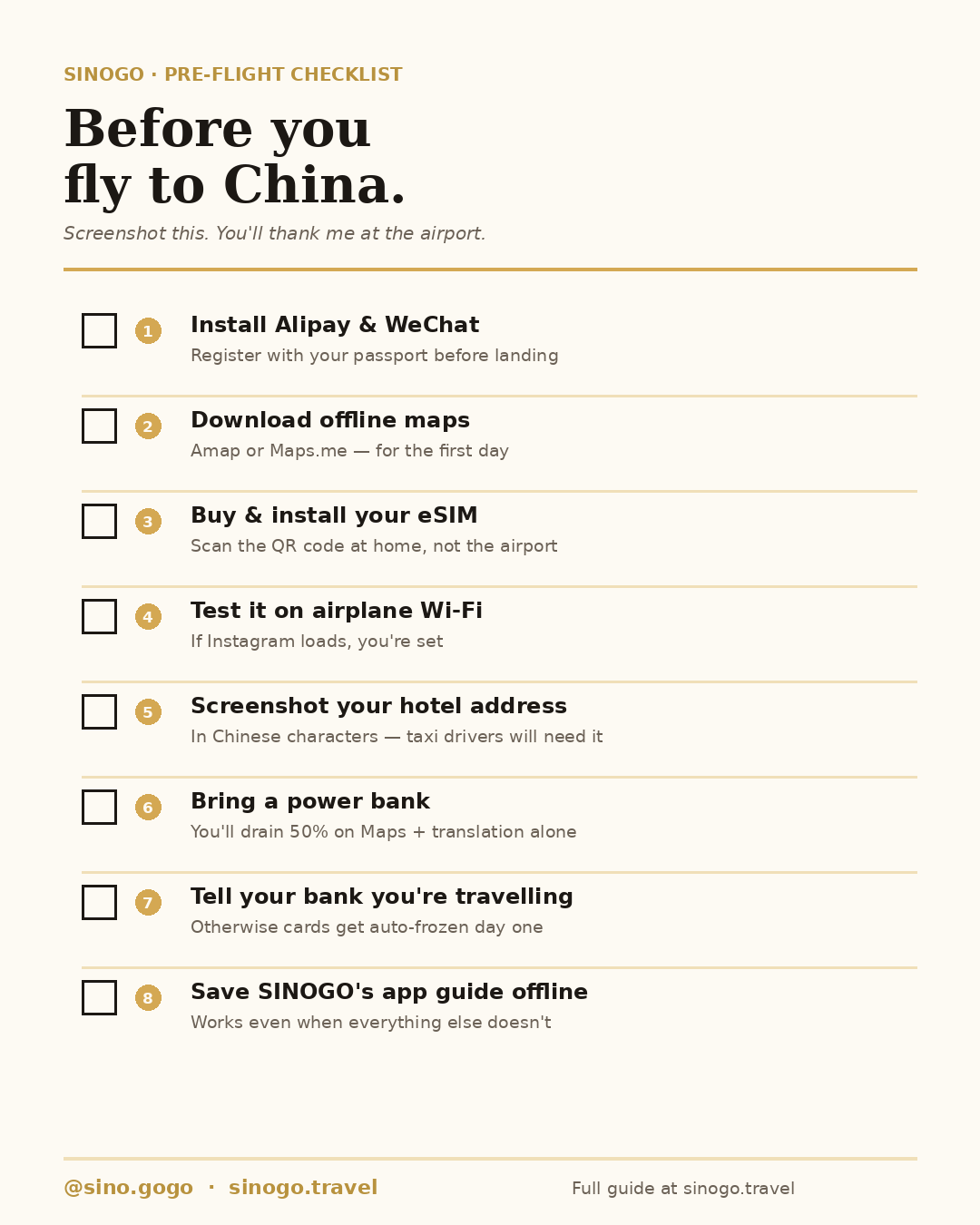
The most common mistake is assuming you'll figure it out once you land. You won't — because by then half the tools you need to figure it out are blocked. Do the setup at home, in pyjamas, with good Wi-Fi, before you ever see the inside of a plane.
🔗 Read next
If you haven't yet, read Every App You Need in China. Once you've got your data connection sorted, those four apps are what turns surviving China into actually enjoying it.
Got a specific question I didn't answer? Reply to this post, or DM @sino.gogo. I write new guides based on what readers ask.