
Here's a secret most China travel guides won't tell you: you don't need 15 apps. You need 2, and one of them does almost everything.
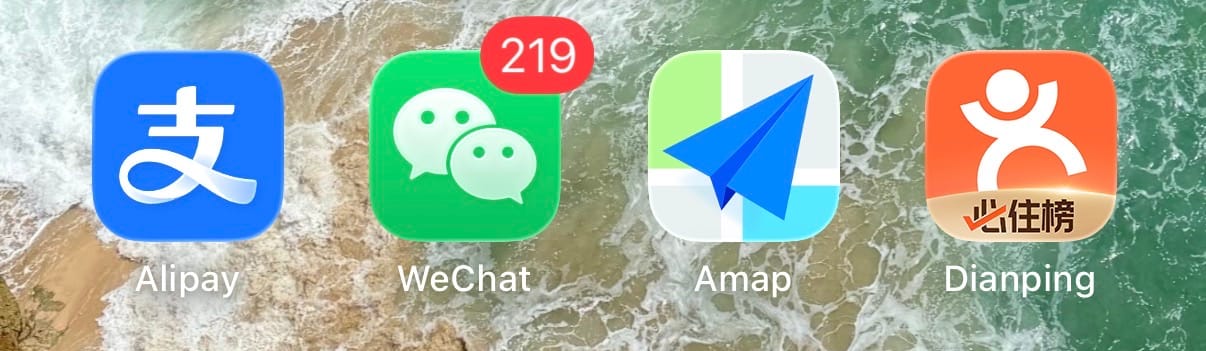
I've been living in China and watching friends visit me for years. The ones who stress out are the ones who downloaded 20 apps and don't know which one to open. The ones who breeze through? They set up Alipay on the plane and figured out the rest on Day 2.
This guide is organized by priority — what to set up before you fly, what to grab in your first week, and what you don't need to download at all.
⏱ Total setup time: ~30 min (do it before your flight)
⭐ Difficulty: Easy if you follow the steps
⚠️ Download everything BEFORE you fly. Google Play is blocked in China, and some apps are harder to find once you're there. All these apps work fine without a VPN once installed — but you'll need an eSIM (or VPN) to access Google, WhatsApp, and Instagram while in China. More on that here →
🏆 THE BIG TWO — Set up before you land
These two apps cover 90% of what you'll need. Everything else is optional.
💰 1. Alipay 支付宝 — The only app you actually NEED
If you download one app for China, make it this one. Not WeChat — Alipay.
🟢 Full English · iOS ↗ · Android ↗
Alipay isn't just a payment app. For foreign visitors, it's your entire phone in China — payments, taxi, train tickets, metro, food delivery, bike rental, currency calculator, and more. All in one app.
The 3 things you'll use every single day:
🏧 Pay everywhere — Link your Visa or Mastercard → scan QR codes to pay at restaurants, street food stalls, convenience stores, metro stations, vending machines — literally everywhere. China is 95% cashless and Alipay works at more places than any other option for foreigners.
🚕 Taxi — DiDi is inside Alipay — Don't download DiDi separately. Open Alipay → search "DiDi" → type your destination in English → get a car → pay automatically. Done.
🚄 Train tickets — 12306 is inside Alipay — Don't download 12306 separately. Alipay → search "12306" → book high-speed rail with your passport number. Beijing → Shanghai? 4.5 hours, ~¥600 ($85). Booked in 2 minutes.
Everything else inside Alipay:
| Need | How | Search in Alipay |
|---|---|---|
| ✈️ Flights & hotels | Trip.com mini program | "Trip.com" |
| 🚇 Metro | City transit QR code | "[city] Metro" |
| 🚌 Bus | City bus QR code | "[city] bus" |
| 🚲 Shared bike | HelloBike (¥1.5/ride, ~$0.20) | "HelloBike" or scan bike |
| 🍜 Food delivery | Ele.me / Meituan | "饿了么" or "美团" |
| 💱 Exchange rate | Built-in calculator, real-time | "exchange rate" |
| 🧾 Tax refund | Digital receipt scan | "tax refund" |
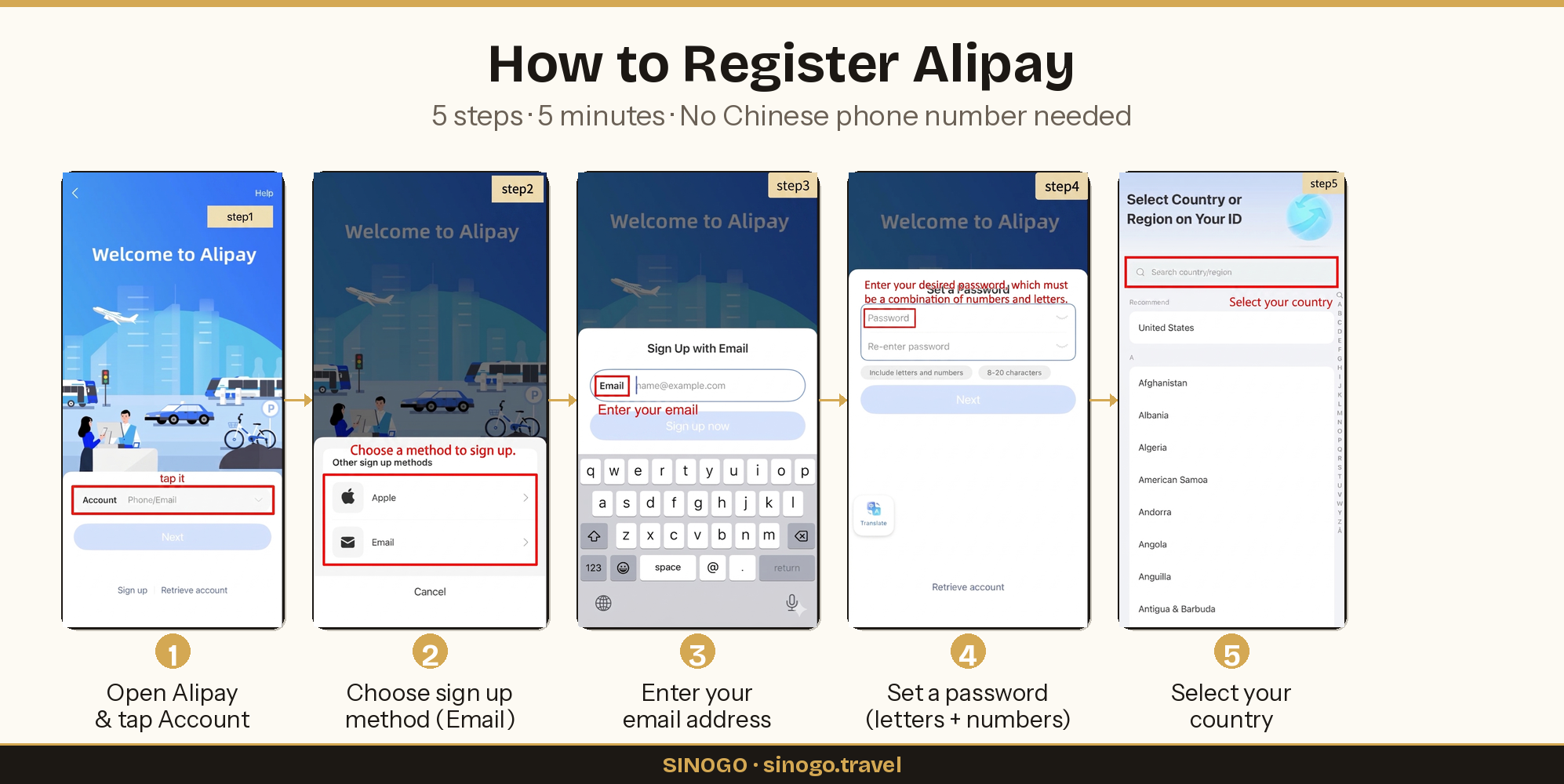
🔧 Phase 1 — Register (5 min):
- Download Alipay from App Store / Google Play
- Open → tap the Account field → tap "Sign up"
- Choose a sign-up method — Email is easiest (Apple ID also works)
- Enter your email → tap "Sign up now"
- Set a password (must include letters + numbers, 8-20 characters)
- Select your country/region → done!
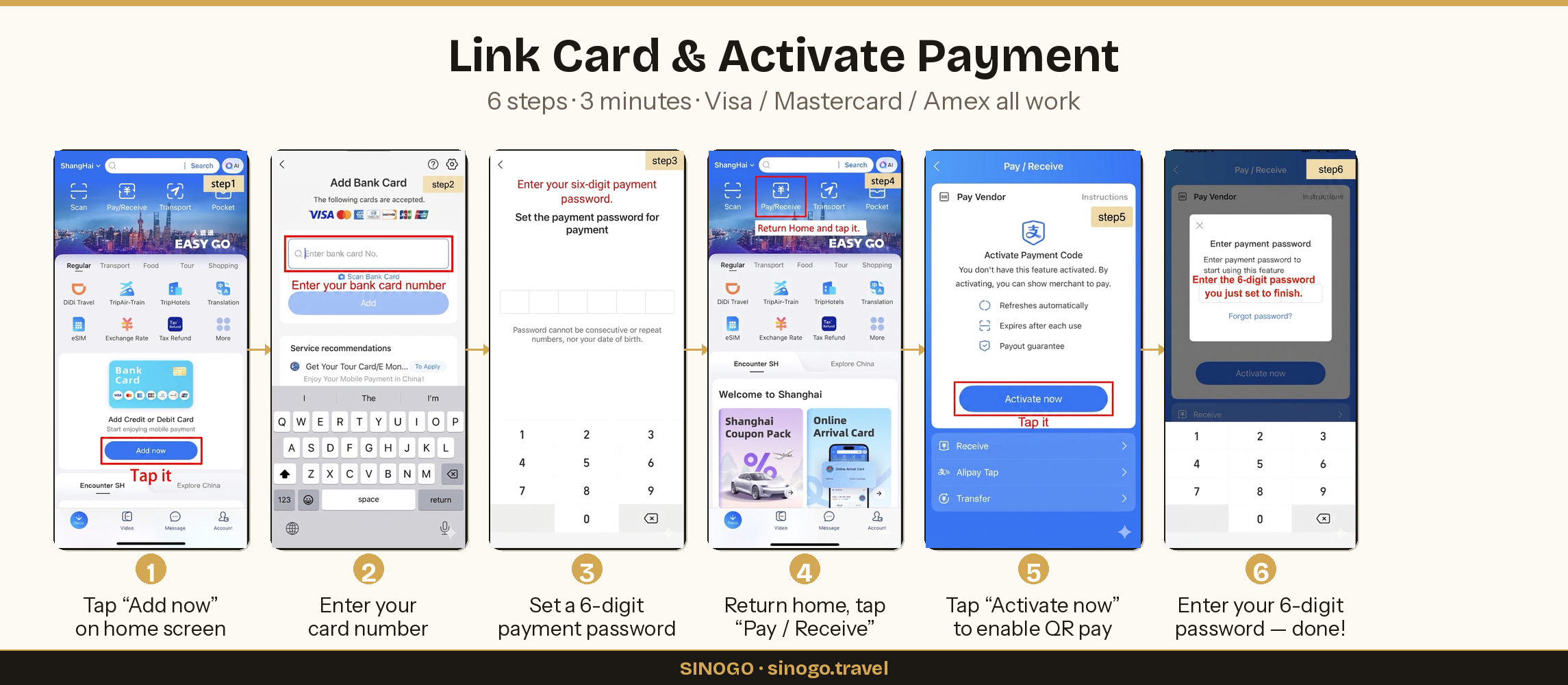
💳 Phase 2 — Link card & activate payment (3 min):
- On home screen, tap "Add now" on the bank card banner
- Enter your Visa / Mastercard / Amex card number
- Set a 6-digit payment password (not your login password — this is just for payments)
- Return home → tap "Pay / Receive" at the top
- Tap "Activate now" to enable your QR payment code
- Enter the 6-digit password you just set — you're ready to pay!
⚠️ Set this up while you still have unrestricted internet (before landing, or at the airport before going through customs). Alipay works fine without a VPN once it's installed.
💡 Gloria's tip: Don't overthink the other apps. I've had friends arrive with 12 apps installed and panic because they didn't know which one to open. Just set up Alipay on the plane. Taxi? Alipay. Train? Alipay. Lunch? Alipay. Metro? Alipay. You can figure out the rest on Day 2.
💬 2. WeChat 微信 — How everyone communicates in China
Alipay handles payments. WeChat handles people.
🟢 Full English · iOS ↗ · Android ↗
Nobody in China uses WhatsApp, iMessage, or SMS. If someone wants your contact, they mean your WeChat. Your hotel, your tour guide, the friend of a friend who's picking you up — everyone will ask "What's your WeChat?"
What you'll use it for:
💬 Messaging — text, voice messages, group chats. This is the ONLY way to communicate with anyone in China.
💰 WeChat Pay — your backup payment method. Most places accept both Alipay and WeChat Pay. Having both means you're covered if one glitches.
📎 Mini programs — similar to Alipay, WeChat also has thousands of built-in apps. Some restaurants only have their menu as a WeChat mini program — you scan a QR code on the table and order directly.
🔍 QR scanning — restaurant menus, adding friends, bike rentals, event check-ins. China runs on QR codes and WeChat is one of the two main scanners.
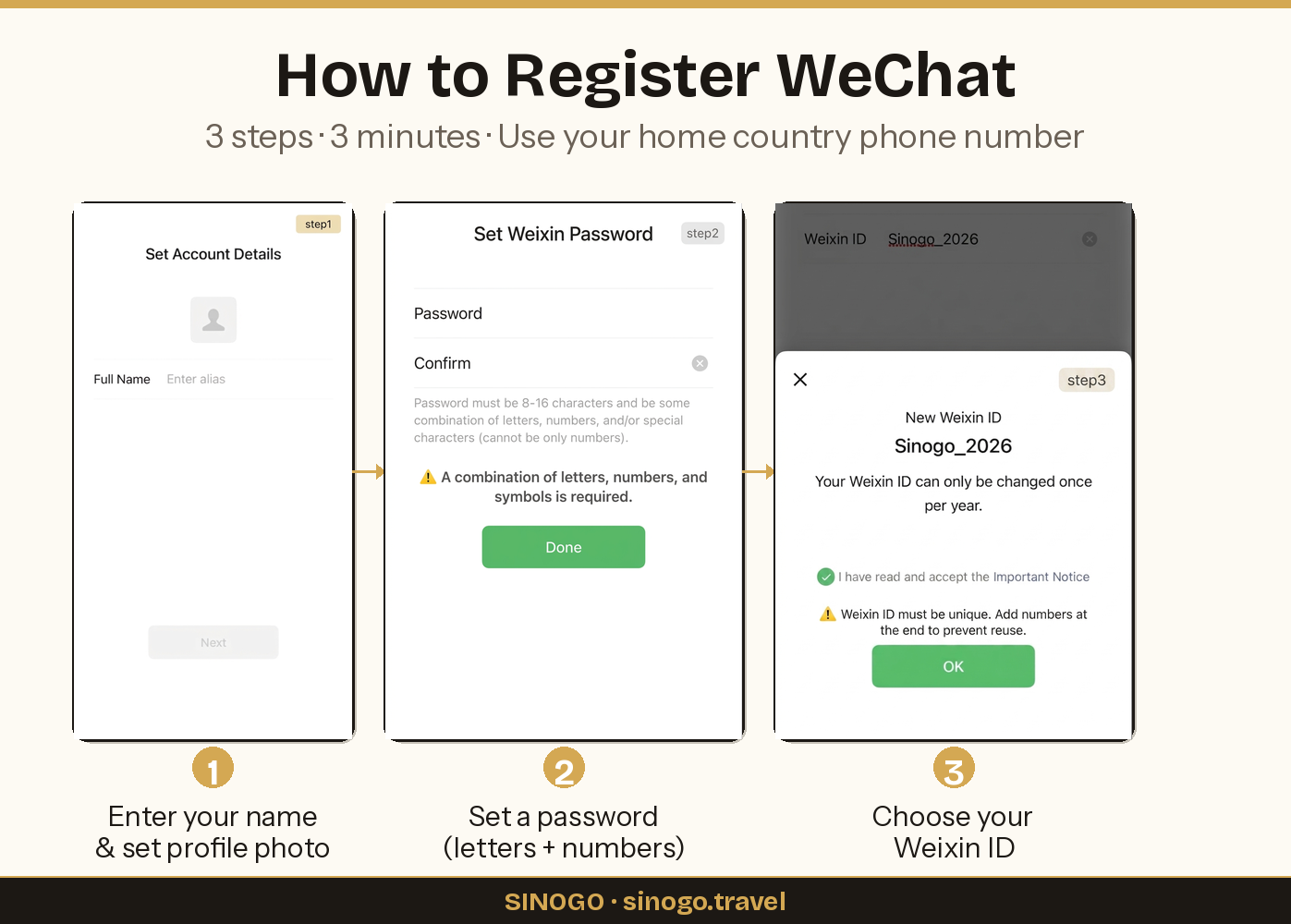
🔧 Phase 1 — Register (3 min):
- Download WeChat from App Store / Google Play
- Register with your home country phone number
- Enter your name and set a profile photo
- Set a password (letters + numbers, 8-16 characters)
- Choose your Weixin ID (this is your username — pick something easy to share)
⚠️ New accounts sometimes need verification from an existing WeChat user. If you don't know anyone in China, post in Reddit r/travelchina — someone will help within hours.
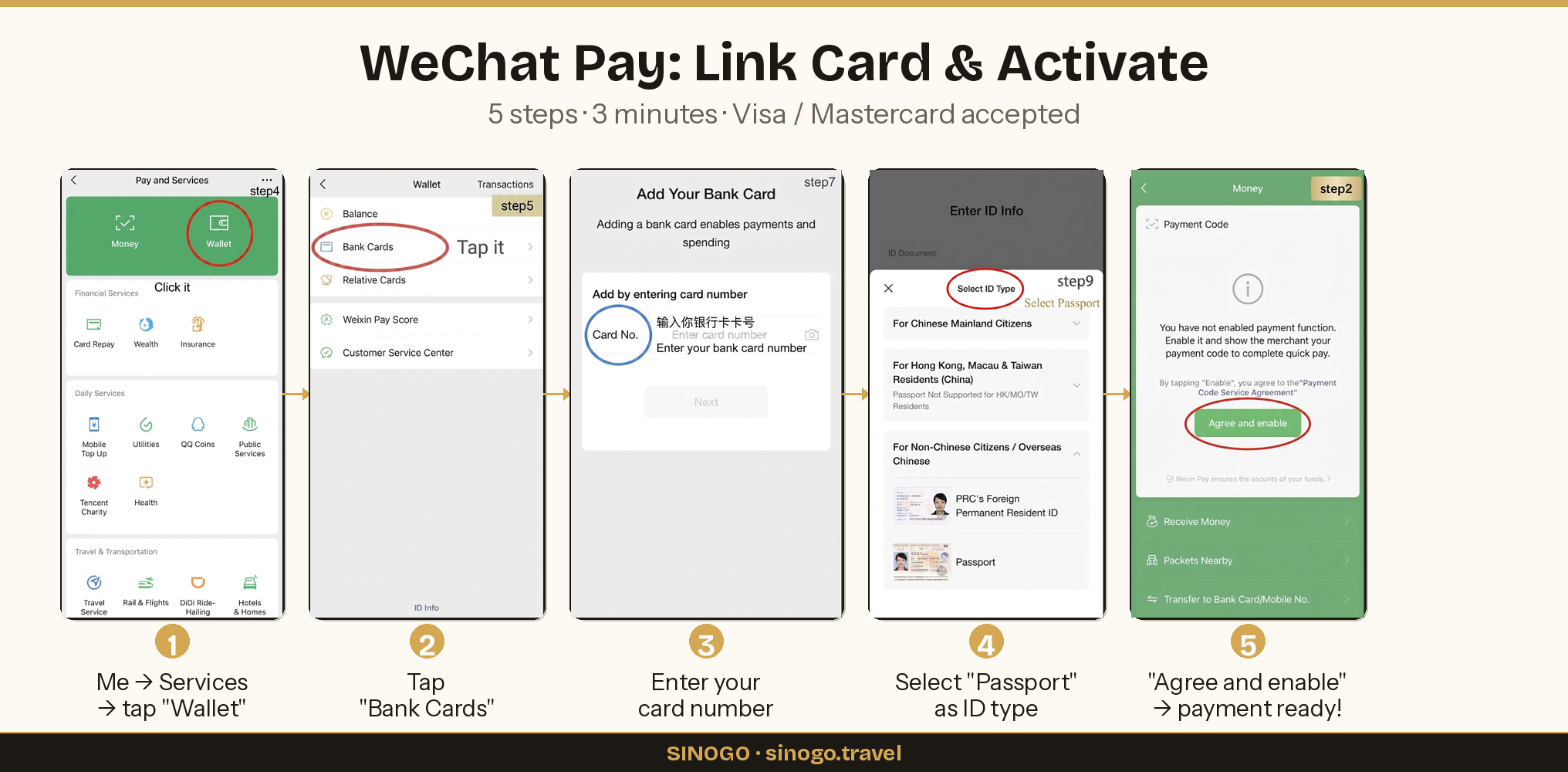
💳 Phase 2 — Link card & activate WeChat Pay (3 min):
- Go to Me → Services → Wallet
- Tap Bank Cards → enter your Visa or Mastercard number
- Select Passport as your ID type → verify identity
- Go to Me → Services → Money → tap "Agree and enable" to activate your payment code
💡 Gloria's tip: Add your hotel's WeChat before you arrive. Most hotels have one. If anything goes wrong — can't find the entrance, need late checkout, lost something in the room — message them on WeChat. Way faster than calling a number and trying to communicate through a language barrier.
📲 DOWNLOAD THESE SEPARATELY — Alipay can't replace them
These 2 apps do things Alipay doesn't. Download them in your first day or two.
🗺 3. Amap 高德地图 — Your real map in China
Google Maps doesn't work here. Apple Maps sort of works but misses a lot. Amap is what 800 million Chinese people actually use.
🟡 Partial English · iOS ↗ · Android ↗
Amap (also called Gaode Map) is the navigation app you need. It shows:
🚶 Walking directions — with accurate building entrances and pedestrian paths 🚇 Metro routes — which exit to use, how long between transfers, real-time schedules 🚌 Bus routes — which stop, which direction, when the next bus arrives 🚗 Driving/taxi routes — real-time traffic, ETA, toll costs 🏢 Indoor maps — inside malls, airports, and train stations
Why not Google Maps? Google Maps in China shows roads in the wrong positions (it's a known GPS offset issue), doesn't list most restaurants or shops, and can't plan metro routes. It will get you lost. Amap won't.
🔧 How to set up:
- Download Amap
- Open → Settings → Language → switch to English
- Allow location access
- Search any destination in English or Chinese — it handles both
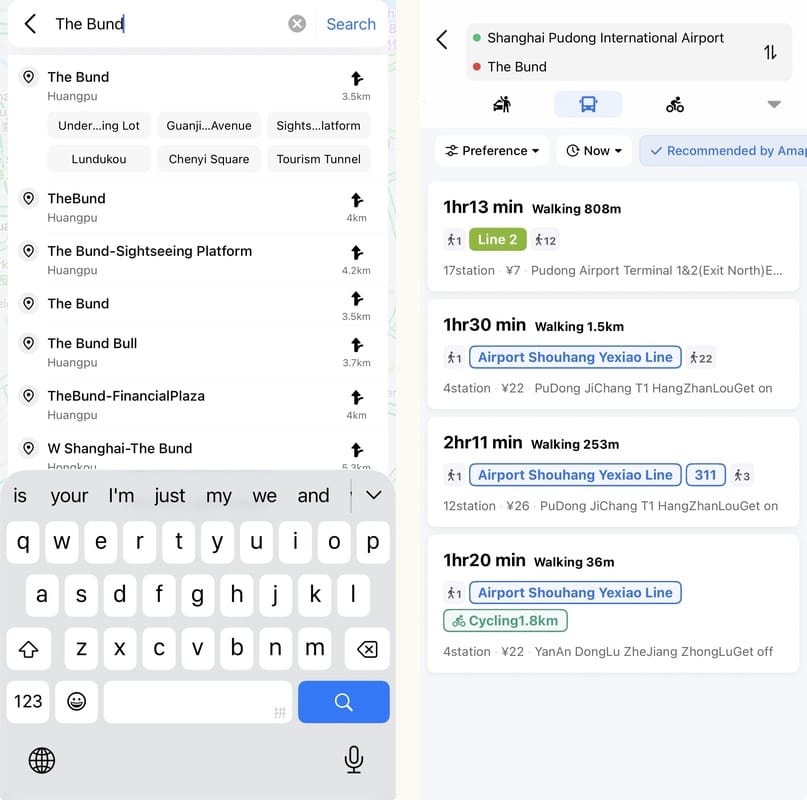
💡 Gloria's tip: Save your hotel address in Chinese in Amap before you leave for the day. If you get lost and need to take a taxi, just show the driver your screen. Also save "nearest metro station" — you'll use it 10 times a day.
⭐ 4. Dianping 大众点评 — China's Yelp
How do you find good food in a country where you can't read the signs? Dianping.
🔴 Chinese only · iOS ↗ · Android ↗
Dianping is China's Yelp + TripAdvisor combined. Restaurants, cafés, bars, spas, attractions — all with ratings, photos, prices, and user reviews.
How to use it without reading Chinese:
📸 Look at the photos — tap any restaurant → scroll to the photo section (图片). Food photos tell you everything you need to know.
⭐ Check the rating — anything above 4.0 is good. Above 4.5 is excellent.
📍 Sort by distance — it automatically shows what's near you.
💰 Check prices — average spend per person (人均) is shown on every listing. ¥30 = cheap local food. ¥100 = nice restaurant. ¥300+ = fancy.
🏷 Look for deals — many restaurants offer Dianping-exclusive discount packages (套餐). Tap the orange price tags to see them.
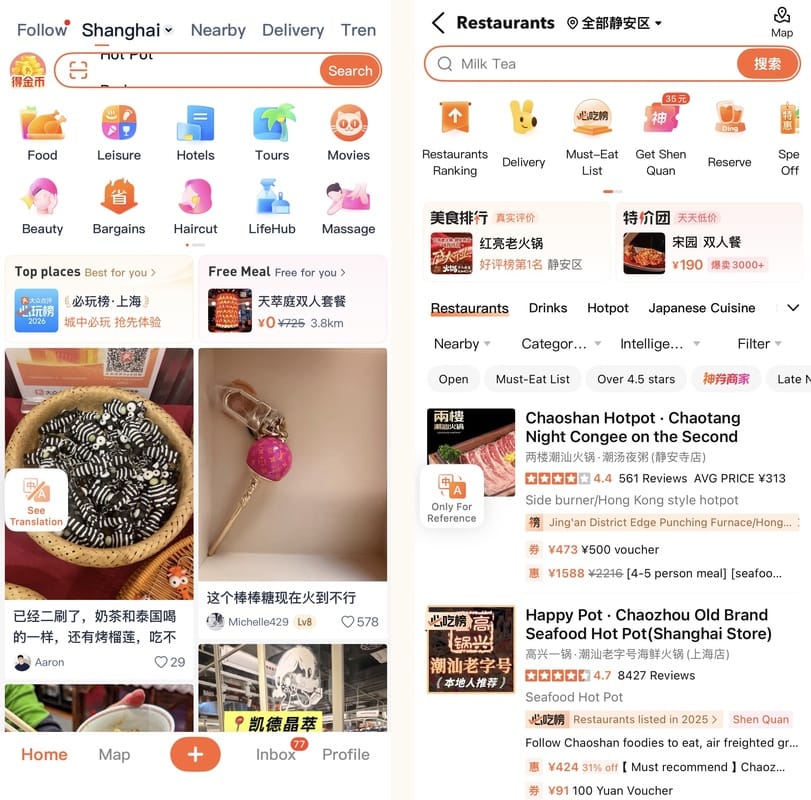
💡 Gloria's tip: Don't just walk into a random restaurant — spend 30 seconds on Dianping first. I've avoided so many tourist-trap restaurants this way. Filter by rating (评分排序), and look at what actual Chinese people are eating in the photos. If the food photos look good and it's above 4.0 stars, you're safe.
✅ DON'T DOWNLOAD — Already inside Alipay
Here's what you do NOT need to download separately. They're all accessible as mini programs inside Alipay:
| App | What it does | How to find it in Alipay |
|---|---|---|
| 🚕 DiDi 滴滴 | Taxi / ride-hailing | Search "DiDi" |
| 🚄 12306 | High-speed rail tickets | Search "12306" |
| ✈️ Trip.com | Flights, hotels, attractions | Search "Trip.com" |
| 🍜 Ele.me 饿了么 | Food delivery | Search "饿了么" |
| 🍔 Meituan 美团 | Food delivery + deals | Search "美团" |
| 🚲 HelloBike 哈啰单车 | Shared bikes | Search "HelloBike" or scan any bike |
| 🚇 Metro | City metro QR code | Search "[city name] Metro" |
| 🚌 Bus | City bus QR code | Search "[city name] bus" |
💡 Gloria's tip: When you first open Alipay, the home screen might look overwhelming with Chinese characters. Don't panic. Just use the search bar at the top — type what you need in English. "DiDi", "12306", "metro", "bike" — it understands English search.
📋 QUICK SUMMARY
| Priority | App | What for | Download? |
|---|---|---|---|
| 🏆 #1 | Alipay 支付宝 | Payments, taxi, train, metro, bus, bike, delivery, exchange rate, tax refund | ✅ Yes |
| 🏆 #2 | WeChat 微信 | Messaging, backup payments, mini programs | ✅ Yes |
| 📲 #3 | Amap 高德地图 | Navigation, walking, metro, bus routes | ✅ Yes |
| 📲 #4 | Dianping 大众点评 | Find restaurants (China's Yelp) | ✅ Yes |
| ✅ Built-in | DiDi, 12306, Trip.com, Ele.me, Meituan, HelloBike, Metro, Bus | All inside Alipay | ❌ No need |
⬇️ Before you go: This guide covers apps. But before any of them work, you need internet access in China — and most of the advice you've read about that is wrong. Here's what actually works in 2026.
Read our Stay Online in China Guide →
Got questions? DM me on Instagram @sino.gogo — I answer every message.
Want all our China guides in one place? Subscribe below and get the complete Starter Kit when it launches.
SINOGO · sinogo.travel · Your trusted guide to China